
IT specialist · Dresden

Abdelrahman Al Hnedi

Microsoft 365, Intune & Security – solutions that work in day-to-day operations.

I secure Microsoft environments, review configurations in a traceable way and automate recurring tasks – with PowerShell, Power Platform and tools of my own.

Abdelrahman Al Hnedi in a navy jacket with folded arms in front of a window

Dresden, Germany

Microsoft 365 · Intune · Entra ID · Defender · PowerShell

Tools that give administrators a basis they can verify.

Three publicly viewable projects I built myself. Status, licence and limitations are stated exactly as each repository documents them.

Assessment states

Instead of just “OK” or “error”, the documentation lists these distinct states:

  1. Aligned
  2. Weaker
  3. More restrictive
  4. Different
  5. Accepted deviation
  6. Expired deviation
  7. Unsupported
  8. Not applicable
  9. Not evaluable

Report formatsHTML · Markdown · JSON · PDF · CSV

01Analysis tool · local and read-only

Intune Policy Auditor

A local web application for exported Microsoft Intune policies. It extracts settings and assignments, compares them against a versioned knowledge pack and explains conflicts in a traceable way.

Decisions

  • Strictly read-only – the code contains no Microsoft Graph write operation and no ReadWrite permission.
  • A judgement requires an exactly known setting ID and value semantics. Anything unknown stays visible as “Not evaluable”.
  • Reports show evidence, pack version and decision trace – as HTML, Markdown, JSON, PDF and CSV.
Status
In active development; tenant mode only partially implemented
Licence
Public code, no open-source licence
Stack
Python · FastAPI · React · SQLite
Last change
Limitations and notes

The bundled knowledge pack is synthetic and for demonstration only – it is not a Microsoft baseline. The project is independent, not endorsed by Microsoft and does not replace professional review.

View repository (external link)

Architecture as documented

  1. 01Entra enterprise application
  2. 02Exchange service principal
  3. 03Application Mail.Send
  4. 04Management scope
  5. 05One shared mailbox

02Admin tool · Exchange Online

Entra Mail.Send RBAC

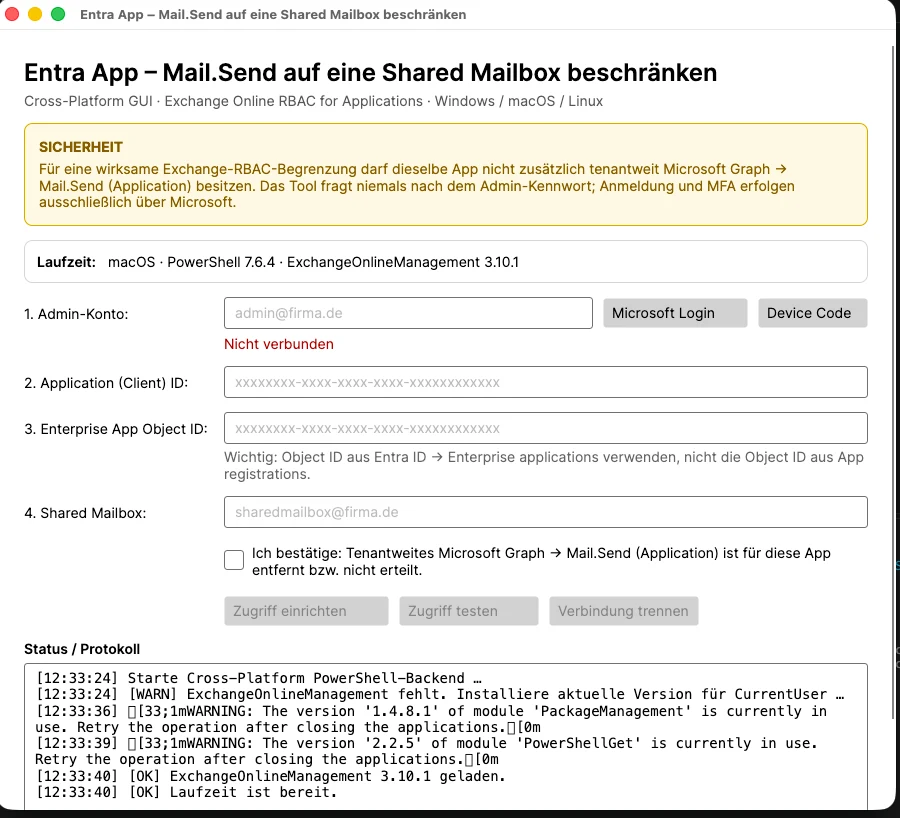
A cross-platform tool that assigns the Exchange Online role Application Mail.Send to an Entra enterprise application for exactly one shared mailbox – instead of tenant-wide Mail.Send through Microsoft Graph.

Decisions

  • Least privilege through a management scope: the permission applies to the specified shared mailbox only.
  • Sign-in happens entirely through Microsoft. MFA, passkeys and Conditional Access stay in place; passwords, secrets and tokens are not stored.
  • After setup the tool verifies the assignment with Test-ServicePrincipalAuthorization and reports RBAC assignments that could widen the scope.
Status
Actively developed; guided three-step workflow, interface in German and English
Licence
No licence file
Stack
PowerShell 7.4 · Avalonia · .NET 10 · Exchange Online
Last change
Limitations and notes

Not an official Microsoft product. The restriction only holds if the same app does not also have tenant-wide Mail.Send through Microsoft Graph – Entra permissions and Exchange RBAC are additive.

Earlier interface of the Entra Mail.Send RBAC tool on macOS with empty input fields and a status log
Screenshot from the repository: earlier interface, placeholder values only.
View repository (external link)
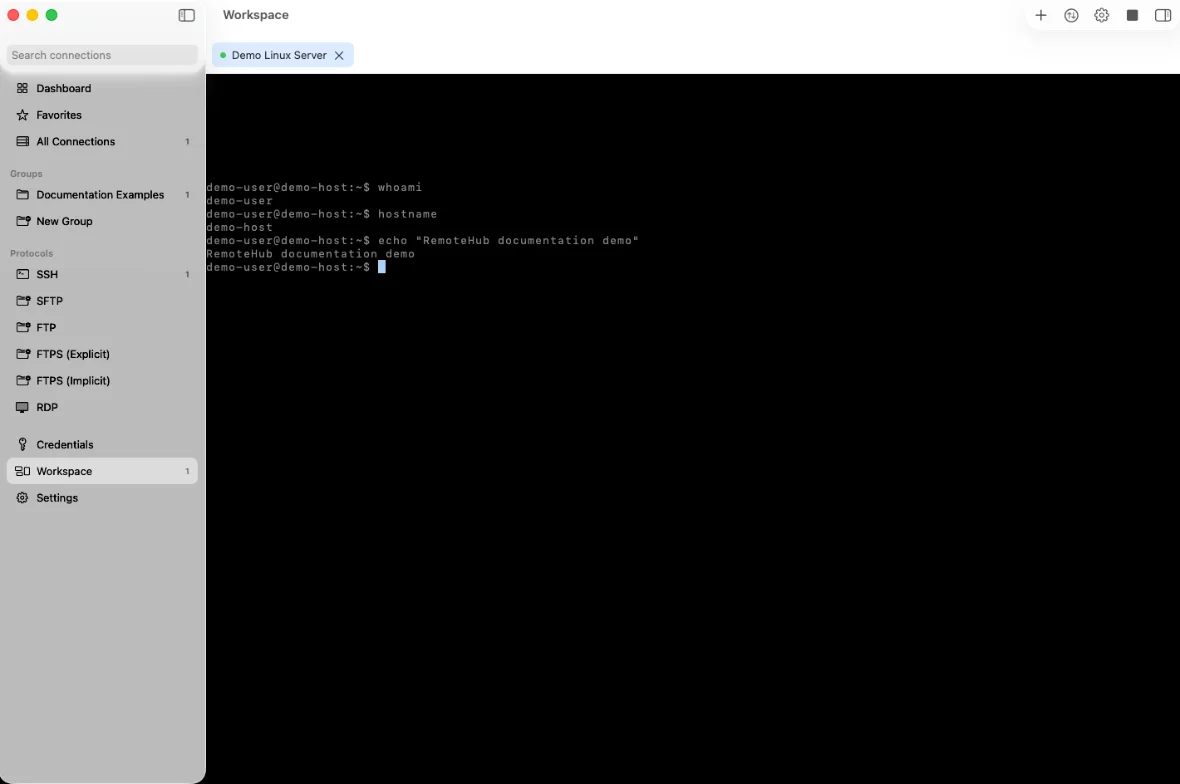
RemoteHub window with a sidebar of connections and protocols and an SSH session to a demo server
Screenshot from the documentation – synthetic demo server.

03macOS app · Swift

RemoteHub

A native, local-first connection manager for macOS: SSH, SFTP, FTP, FTPS and FreeRDP sessions in one interface. Connection metadata lives in SwiftData, passwords and passphrases in the macOS Keychain.

Decisions

  • SSH terminal with exact validation of the negotiated host key.
  • Credentials stored as device-local, non-synchronising Keychain items.
  • Versioned JSON import and export without secrets; FreeRDP is not bundled but checked before launch.
Status
In active development; not notarised, no independent security audit
Licence
MIT
Stack
Swift · SwiftData · Keychain · SwiftTerm
Last change
Limitations and notes

According to its README this is not yet a production-ready distribution. Interactive SSH requires macOS 15; the documented limitations should be read before using it with sensitive systems.

View repository (external link)

All public projects on GitHub (external link)

Abdelrahman Al Hnedi in a beige jacket at a desk, resting his hand on his chin

IT that holds up in everyday work.

I am an IT specialist based in Dresden. I work on Microsoft 365 environments: device management with Intune, identities and permissions in Entra ID and Exchange Online, and protection features such as Microsoft Defender and Conditional Access.

I am drawn to the places where security meets daily routine: policies nobody has an overview of any more, permissions that reach further than they should, tasks that run the same way every week. For those I build tools and automations – documented so they can be followed and, where it fits, published on GitHub.

Alongside that I build native macOS apps and Home Assistant integrations.

Location
Dresden, Saxony
Focus
Microsoft 365 · Intune · Entra ID · Security
References
Confidential, on request

Based in Dresden

This is where I live and work – between the Elbe and the old town.

Region
Saxony, Germany
Time zone
CET / CEST (UTC+1 / +2)

51.05° N · 13.74° E

Abdelrahman Al Hnedi at a railing by the Elbe with Dresden’s old town behind him in evening light
Image composition, AI-assisted

Four areas that belong together in daily operations.

  1. 01

    Modern workplace

    Microsoft 365 and Intune for Windows and macOS devices: policies, assignments, compliance and a controlled rollout.

    Microsoft 365 · Intune · Windows · macOS · Teams · SharePoint

  2. 02

    Identity & access

    Entra ID, Conditional Access and Exchange Online permissions following the principle of least privilege.

    Entra ID · Conditional Access · Exchange Online · Application RBAC · Active Directory

  3. 03

    Security

    Microsoft Defender, hardened endpoints and configurations that can be reviewed in a traceable way.

    Defender · Attack Surface Reduction · Graylog · Checkmk

  4. 04

    Automation

    PowerShell, Microsoft Graph and Power Platform for tasks that would otherwise be done by hand every week.

    PowerShell · Microsoft Graph · Power Automate · Power Apps · n8n

AlsoPython & FastAPI · Swift & SwiftData · .NET & Avalonia · Docker · Git & GitHub Actions · Home Assistant · Linux

Tools in use

A selection of the platforms and tools I work with.

Microsoft 365

  • Microsoft 365
  • Intune
  • Entra ID
  • Defender
  • Teams
  • SharePoint
  • OneDrive
  • Azure

Automation

  • PowerShell
  • Power Automate
  • Power Apps
  • Power BI
  • n8n

Development

  • Python
  • Git
  • GitHub
  • VS Code
  • Docker

Infrastructure

  • Windows Server
  • Linux
  • Fedora
  • Proxmox
  • VMware
  • Graylog
  • Checkmk
  • Cisco
  • Fortinet

Understand first, then automate.

Four principles that run through my projects – each with the project where you can check it.

  1. 01

    Read before you change

    Take stock without write access: configurations and exports are analysed first, not modified.

    Intune Policy Auditor is strictly read-only.

  2. 02

    Scope permissions tightly

    Permissions as small as possible and verifiable: one scope, one mailbox, one test.

    Entra Mail.Send RBAC verifies the assignment after setup.

  3. 03

    Automate what repeats

    Whatever is done by hand on a regular basis becomes a script with clear steps and readable output.

    Teams Membership Export produces its report as an Excel workbook.

  4. 04

    State the limits

    Tests, CI and documented limitations are part of the work – including what a tool does not do.

    RemoteHub states plainly that it is not notarised or audited.

Abdelrahman Al Hnedi at a desk with two monitors, Dresden’s old town in the background
Illustration · AI-assisted image composition

Experiments and side projects

Smaller tools and integrations, each with its status stated openly. Unofficial projects have no connection to the services they name.

  • Blitzer.de for Home Assistant (external link)

    Unofficial integration for speed-camera reports around a location and along a route – with map entities, diagnostics and an interface in German, English and Arabic.

    Unofficial; the upstream endpoint is undocumented.

  • Mawaqit Island (external link)

    Independent macOS app that shows the next prayer with a live countdown at the notch – in Arabic, German and English.

    Not notarised by Apple; not associated with MAWAQIT.

  • Teams Membership Export (external link)

    PowerShell tool that exports all of a user’s Teams memberships and roles to an Excel workbook.

    Public code without a licence file.

  • DHSN Stundenplan (external link)

    Unofficial, read-only Home Assistant calendar integration that shows a seminar group’s timetable.

    Experimental; permission for automated requests has not been confirmed.

What you can verify

  • Public code

    Every project shown here can be viewed on GitHub – with README, status and, where one exists, a licence.

    GitHub profile (external link)
  • Professional profile

    Career history and positions are on LinkedIn.

    LinkedIn profile (external link)
  • References

    Employment references contain confidential details. I share them on request where there is a legitimate professional interest.

    Request by email

Project details last checked against the repositories on 22 November 2026.

Let’s talk about your Microsoft environment.

For professional exchange, project enquiries or new roles, you can reach me by email or on LinkedIn.

Write an email: info@al-hnedi.de
Location
Dresden, Germany